Introduction
If you’ve ever wanted to write something in cursive, for a social media bio, a wedding invitation, a tattoo design, or just for fun — you’ve probably searched for a cursive font tool online.
And then you hit a wall: free vs paid. Which one should you actually use?
Some paid tools cost $10–$50/month and promise professional-grade cursive fonts. Meanwhile, free cursive font tools are everywhere — and many of them work surprisingly well.
So the real question is: are paid tools actually worth it, or is free good enough?
In this post, we break down exactly what paid and free cursive font tool offer, where each one shines, and which one makes sense for your specific needs — whether you’re a casual user, a designer, or a content creator.
What Are Cursive Font Tools?
A cursive font tool is any online tool, app, or software that lets you type text and converts it into cursive, script, or handwriting-style lettering.
There are two main types:
1. Unicode-based cursive generators — These are browser-based tools (like Cursive Text Generator) that convert your typed text into cursive-style Unicode characters. The result can be copied and pasted anywhere — Instagram, TikTok, Discord, email, WhatsApp — without installing any font.
2. Font download tools / design software — These are platforms (like Adobe Fonts, MyFonts, or Canva Pro) where you download actual font files (.ttf or .otf) or use them inside a design editor. These usually cost money.
Both types have their place. But they serve very different purposes — and most people don’t need the paid version. If you want to go deeper on how these two approaches actually compare in practice, we’ve covered exactly Cursive Font Copy and Paste vs Font Installation — including where each one works and where it completely fails.
Free Cursive Font Tools: What You Get
Free cursive font tools have come a long way. Here’s what a good one offers today:
✅ Instant Copy-Paste Cursive Text
Tools like Cursive-Text-Generator.com use Unicode characters to produce cursive-style text you can paste anywhere. No font installation. No design software. No app download. You type, you copy, you paste.
✅ Multiple Style Options
A quality free cursive generator doesn’t give you just one style. Cursive Text Generator, for example, offers multiple styles including:
- Classic cursive (normal and bold)
- Italic serif and sans-italic
- Gothic and Fraktur
- Double Struck, Small Caps, Bubbles, and more
This is more style variety than most paid font packs.
✅ Works on Every Platform
Because the output is Unicode text — not an image or a font file — it works natively everywhere. Instagram bio, TikTok caption, Twitter/X username, Discord server name, WhatsApp message, email signature. Any device, any platform.
✅ No Signup, No Subscription
You don’t need an account. You don’t give your email. You don’t start a free trial that turns into a charge. Free means free.
✅ Extra Features Built In
Modern free tools often include more than just text conversion. Cursive Text Generator includes:
- Live real-time preview
- Platform preview mode (see how text looks on Instagram, Twitter, TikTok)
- Text stats (character count, word count)
- Quick transforms: reverse, mirror, UPPER, lower, title case
- Copy history (saves your last 6 outputs)
- Download as .txt or PNG image
- Copy-for-Word option
Paid Cursive Font Tools: What You Get
Paid tools are usually design platforms or font marketplaces. Here’s what they offer that free tools don’t:
Downloadable Font Files
If you need to use a cursive font inside Adobe Illustrator, Photoshop, Microsoft Word, or a web project — you need an actual font file (.ttf, .otf, .woff). Free Unicode generators can’t give you that.
Commercial Licensing
If you’re a designer creating logos, brand materials, or products for clients — you likely need a commercial font license. Free Unicode text tools don’t carry copyright, but free font downloads often do.
Premium Calligraphy Fonts
Platforms like MyFonts, Creative Market, or Envato Elements have thousands of hand-crafted cursive and calligraphy fonts made by professional type designers. These are often stunning and unique — something you won’t find in a Unicode generator.
Design Software Integration
If you use Canva Pro, Adobe Express, or Figma — paid integrations give you access to professional font libraries that work inside the tool. This is useful if you’re building visual content regularly.
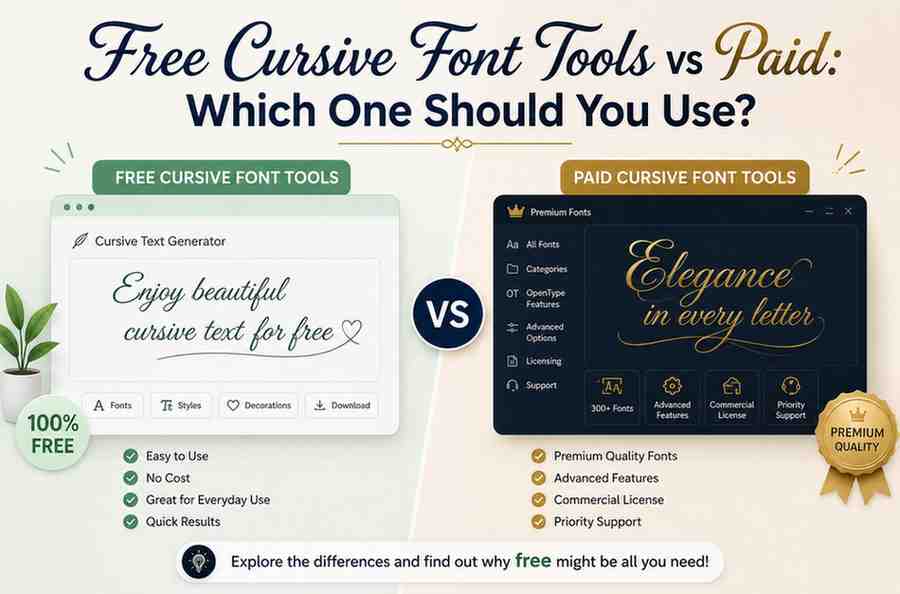
Free vs Paid: Side-by-Side Comparison
| Feature | Free Cursive Font Tools | Paid Cursive Font Tools |
| Cost | $0 | $5–$50+/month |
| Copy-paste to social media | ✅ Yes | ❌ No (image only) |
| Works without signup | ✅ Yes | ❌ Usually requires account |
| Downloadable font files | ✅ Yes | ✅ Yes |
| Commercial license | ❌ Not applicable | ✅ Yes |
| Multiple styles | ✅ Thousands of fonts | ✅ Thousands of fonts |
| Works on mobile | ✅ Yes | ⚠️ Depends on app |
| Instant preview | ✅ Yes | ⚠️ Depends |
| Best for social media | ✅ Best choice | ❌ Overkill |
| Best for print/design work | ✅ Best | ✅ Best choice |
Who Should Use Free Cursive Font Tools?
Free cursive font tools are the right choice if you:
- Want to style your Instagram bio, TikTok username, or Twitter name in cursive
- Need cursive text for captions, comments, or DMs
- Want a cursive email signature or WhatsApp status
- Are looking for tattoo font inspiration
- Need a quick cursive name or quote for a greeting card, personal message, or elegant stationery like wedding invites
- Want to practice cursive writing reference online
- Are a teacher, student, or hobbyist who just needs to see text in cursive
For all of these use cases — free tools like Cursive Text Generator handle it perfectly, with zero cost and zero friction.
Common Questions About Free Cursive Font Tools
Is free cursive text actually good quality?
Yes — when the tool uses Unicode characters properly. Unicode cursive text looks clean and consistent because it’s part of the standard text encoding used by every modern device and operating system. It’s not a workaround or a hack. It’s the same standard that renders every character you read online.
Can I use free cursive text in my Instagram bio?
Absolutely. Instagram fully supports Unicode characters in bios, usernames, and captions. Just generate your cursive text, copy it, and paste it directly into your bio field. It will display correctly for every viewer, on every device.
Does free cursive text work on all devices?
Yes. Because it’s Unicode — not a custom font — it renders correctly on iPhone, Android, Windows, Mac, Chromebook, and any other modern device. No installation needed on either end.
Is there a difference between a cursive text generator and a cursive font generator?
Slightly. A cursive text generator converts your typed words into Unicode cursive characters you can copy-paste anywhere. A cursive font generator sometimes refers to the same thing, but can also mean a tool that helps you browse or download actual font files. Both terms are often used interchangeably online.
Are free cursive generators safe to use?
Good free tools are safe. They process your text locally in the browser — no data is saved or sent to a server. Tools like Cursive Text Generator require no signup and collect no personal information.
Can I download my cursive text as an image?
Yes. Cursive Text Generator lets you export your styled text as a PNG image directly from the tool — no design software needed. This is useful for social media posts, stories, or any visual where you need cursive as a graphic.
Final Verdict: Is Free Good Enough?
For most people — yes, free is not just good enough. It’s actually better.
Paid cursive font tools serve a real purpose for professional designers who need font files and commercial licenses. But if you’re using cursive for social media, personal content, creative projects, or anything that lives online — a free cursive font generator handles it faster, easier, and at zero cost.
Stop paying for something you can get for free — and get better results too.
Pingback: Playful vs Elegant Cursive Fonts — Choosing the Right Style