Introduction
You want to use a beautiful cursive font. You have two choices.
You can install a cursive font on your computer — download a file, go through the steps, and hope it works where you need it. Or you can use a Cursive font copy and paste tool — type your text, pick a style, copy it, and paste it anywhere in seconds.
Combining decorative fonts with a generative AI logo is a creative way to develop personalized visual designs for social media profiles, digital projects, and small business branding.
Both methods give you cursive text. But they work in very different ways. And for most people — especially if you want to use cursive on Instagram, TikTok, Discord, or WhatsApp — one method is far better than the other.
In this guide, we break down both methods step by step. We look at how they work, where they work, and which one is actually worth your time.
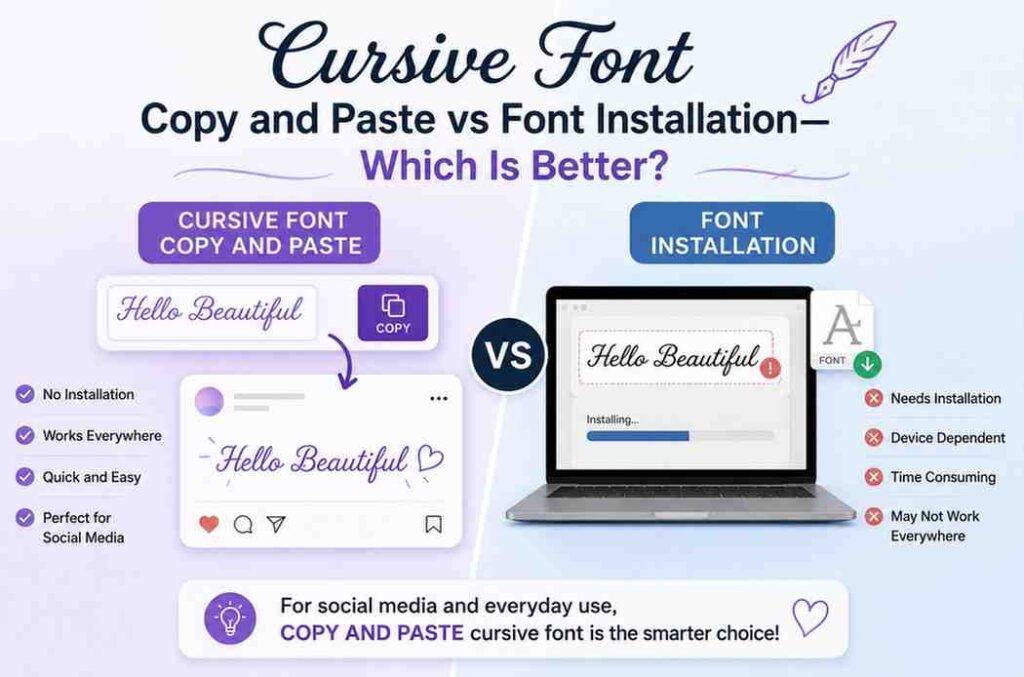
Quick Answer: Cursive font copy and paste wins for social media and everyday use. Font installation wins only for professional design work like printing, or publishing.
What Is Cursive Font Copy and Paste?
Cursive font copy and paste is a method that lets you generate cursive-style text using an online tool and then copy and paste it directly into any app, platform, or website.
The text you generate does not use a font file at all. Instead, it uses Unicode characters — a global text standard that every modern device already understands. These special Unicode characters look like cursive letters, but they behave just like normal text.
Here is what that means for you:
- You do not need to download anything
- You do not need to install anything
- The cursive text works instantly on Instagram, TikTok, Discord, Twitter, WhatsApp, and more
- Anyone who sees your text will see the cursive style — even if they have never installed a cursive font in their life
Tools like cursive-text-generator.com offer a wide range of cursive styles. You type your text, the tool converts it to Unicode cursive characters in real time, and you copy and paste the result wherever you want.
What Is Cursive Font Installation?
Cursive font installation is the traditional method. You download a font file (usually a .TTF or .OTF file) from a font website, install it on your device, and then select it inside a specific app like Microsoft Word, Photoshop, or Canva.
The font lives on your computer. When you use it in a document, the document displays the cursive style — but only on devices that have that same font installed.
How Each Method Works: Step by Step
Cursive Font Copy and Paste — 3 Steps
- Go to a cursive font generator (like cursive-text-generator.com)
- Type your text and pick a style from 18+ options
- Click copy and paste it anywhere you want
Total time: Under 30 seconds. No downloads. No setup.
Cursive Font Installation — 6+ Steps
- Search for a cursive font on a font website (Google Fonts, DaFont, etc.)
- Download the font file (usually a ZIP archive)
- Unzip the downloaded file
- Right-click the font file and select “Install” (Windows) or double-click and click “Install Font” (Mac)
- Restart your app (Word, Photoshop, etc.)
- Open your app, find the font in the dropdown, and apply it to your text
Total time: 5 to 15 minutes. Requires admin access on some computers. Font only works in apps on that device.
The Big Difference: Where Your Cursive Text Actually Works
This is the most important thing to understand. It changes everything.
Cursive Copy and Paste — Works Everywhere
Because cursive copy and paste uses Unicode characters, your text looks exactly the same on every device and every platform. The person reading your Instagram bio, seeing your Discord name, or receiving your WhatsApp message does not need to have any font installed. The cursive style travels with the text itself.
It works on:
- Instagram (bios, captions, comments, stories)
- TikTok (bios, usernames, captions)
- Twitter / X (display names, bios, tweets)
- Discord (usernames, server names, messages)
- WhatsApp, Telegram, Facebook Messenger
- YouTube (channel names, descriptions)
- Reddit (posts, comments, usernames)
- Email (Gmail, Outlook, Apple Mail)
- Google Docs and Microsoft Word
- File names on Windows, Mac, and Linux
- Even your Wi-Fi network name
Cursive Font Installation — Works Only in Specific Apps on Your Device
When you install a cursive font and use it in a Word document or a Photoshop file, the font only displays correctly if the person opening that file also has the same font installed on their device.
If they do not have the font, one of two things happens:
- The text switches to a default font automatically (usually Times New Roman or Arial)
- The document shows an error or substitutes a completely different style
Font installation does not work at all on social media. You cannot choose an installed font for your Instagram bio or your TikTok username. Social media platforms control their own font display. The only way to get cursive text on these platforms is through Unicode — which is exactly what copy and paste tools use.
Side-by-Side Comparison
| Feature | Cursive Copy & Paste | Font Installation |
| Setup time | Under 30 seconds | 5–15 minutes |
| Download required | No | Yes |
| Works on social media | ✅ Yes | ❌ No |
| Works for all viewers | ✅ Yes | ❌ Only if they have the font |
| Works on mobile | ✅ Yes | ❌ Limited |
| Works in Word / Photoshop | ✅ Yes | ✅ Yes |
| Number of styles | 18+ (free) | Depends on what you download |
| Completely free | ✅ Yes | Sometimes (many fonts cost money) |
| Works offline | ❌ Needs internet to generate | ✅ Yes (once installed) |
| Good for printing | ⚠️ Limited | ✅ Best choice |
| Good for social media | ✅ Best choice | ❌ Not possible |
Common Questions People Ask
Does cursive copy and paste work on iPhone and Android?
Yes. Unicode characters are built into every modern iPhone and Android operating system. Open your mobile browser, visit a cursive font generator, type your text, tap to copy, and paste it into any app. The cursive style works perfectly on both iOS and Android — no app download required.
Why does the cursive text look the same everywhere I paste it?
Because it uses Unicode characters, not a font. Unicode is an international text standard supported by every modern operating system, browser, and platform. The cursive style is built into the characters themselves — so wherever you paste them, they look exactly the same.
Can I use cursive copy and paste in Microsoft Word?
Yes. Copy and paste your cursive Unicode text into Word and it displays exactly as styled. This works in Word for Windows, Word for Mac, Word Online, and the Word mobile app.
Why does my installed cursive font not show on Instagram?
Instagram does not allow custom fonts in bios, captions, or usernames. The platform controls its own typography. The only way to display cursive-style text on Instagram is through Unicode characters — which is what copy and paste cursive tools generate.
Is a cursive font generator free?
Yes. Tools like cursive-text-generator.com are completely free. No subscription, no premium plan, no watermarks. You can generate as many styles as you want with no limits.
What happens if someone’s device does not support Unicode cursive?
Very old devices (pre-2012 operating systems) may not fully support all Unicode ranges. On modern devices — which is the vast majority of people today — cursive Unicode text displays correctly. If a character shows as a box or question mark, simply try a different cursive style from the generator, as different styles use different Unicode ranges.
Can I use cursive text in my Discord username?
Yes. Discord fully supports Unicode text in display names, server names, nicknames, and messages. Generate your cursive text, copy it, and paste it directly into your Discord name field.
Final Verdict: Which Is Better?
For social media, messaging, and everyday online use: Cursive Writing Generator wins every time. It is faster, easier, works on every platform, and is completely free.
For professional print design and branded offline documents: Font installation is still the right choice when you need precise typographic control for physical or highly formatted digital media.
But for the vast majority of people who want cursive text — for their Instagram bio, their Discord name, a stylish caption, a personalised message, or a YouTube channel name — cursive font copy and paste is not just the better option. It is the only option that actually works.
Pingback: Free Cursive Font Tools vs Paid: Which One Should You Use?